
1. What is Google Search Console?
%22%2F%3E%3Ccircle%20cx%3D%221120%22%20cy%3D%220%22%20r%3D%22280%22%20fill%3D%22%23a369f9%22%20opacity%3D%22.12%22%2F%3E%3Ctext%20x%3D%2254%22%20y%3D%2260%22%20fill%3D%22%23c8a7ff%22%20font-size%3D%2220%22%20font-weight%3D%22700%22%20letter-spacing%3D%223%22%20font-family%3D%22Arial%2Csans-serif%22%3EGOSOCIAL%20%C2%B7%20INSIGHTS%3C%2Ftext%3E%3Ctext%20x%3D%2254%22%20y%3D%22127%22%20fill%3D%22%23fff%22%20font-size%3D%2242%22%20font-weight%3D%22700%22%20font-family%3D%22Arial%2Csans-serif%22%3EGoogle%20Search%20Console%3C%2Ftext%3E%3Ctext%20x%3D%2254%22%20y%3D%22215%22%20fill%3D%22%23ded1ef%22%20font-size%3D%2223%22%20font-weight%3D%22400%22%20font-family%3D%22Arial%2Csans-serif%22%3EUnderstand%20how%20Google%20discovers%20your%20website%20and%20how%20it%20performs%20in%20search.%3C%2Ftext%3E%3Crect%20x%3D%2254%22%20y%3D%22310%22%20width%3D%22345%22%20height%3D%22220%22%20rx%3D%2220%22%20fill%3D%22%23ffffff%22%20opacity%3D%22.07%22%20stroke%3D%22%23c4a0f6%22%20stroke-opacity%3D%22.36%22%2F%3E%3Ccircle%20cx%3D%2284%22%20cy%3D%22345%22%20r%3D%2214%22%20fill%3D%22%239d6ef0%22%2F%3E%3Ctext%20x%3D%2279%22%20y%3D%22351%22%20fill%3D%22%23fff%22%20font-size%3D%2216%22%20font-family%3D%22Arial%2Csans-serif%22%3E1%3C%2Ftext%3E%3Ctext%20x%3D%2278%22%20y%3D%22390%22%20fill%3D%22%23cdb0ff%22%20font-size%3D%2220%22%20font-weight%3D%22700%22%20font-family%3D%22Arial%2Csans-serif%22%3ESEARCH%20PERFORMANCE%3C%2Ftext%3E%3Ctext%20x%3D%2278%22%20y%3D%22449%22%20fill%3D%22%23fff%22%20font-size%3D%2223%22%20font-weight%3D%22400%22%20font-family%3D%22Arial%2Csans-serif%22%3EClicks%2C%20impressions%20and%3C%2Ftext%3E%3Ctext%20x%3D%2278%22%20y%3D%22480.74%22%20fill%3D%22%23fff%22%20font-size%3D%2223%22%20font-weight%3D%22400%22%20font-family%3D%22Arial%2Csans-serif%22%3Eposition%3C%2Ftext%3E%3Crect%20x%3D%22423%22%20y%3D%22310%22%20width%3D%22345%22%20height%3D%22220%22%20rx%3D%2220%22%20fill%3D%22%23ffffff%22%20opacity%3D%22.07%22%20stroke%3D%22%23c4a0f6%22%20stroke-opacity%3D%22.36%22%2F%3E%3Ccircle%20cx%3D%22453%22%20cy%3D%22345%22%20r%3D%2214%22%20fill%3D%22%239d6ef0%22%2F%3E%3Ctext%20x%3D%22448%22%20y%3D%22351%22%20fill%3D%22%23fff%22%20font-size%3D%2216%22%20font-family%3D%22Arial%2Csans-serif%22%3E2%3C%2Ftext%3E%3Ctext%20x%3D%22447%22%20y%3D%22390%22%20fill%3D%22%23cdb0ff%22%20font-size%3D%2220%22%20font-weight%3D%22700%22%20font-family%3D%22Arial%2Csans-serif%22%3EINDEXING%3C%2Ftext%3E%3Ctext%20x%3D%22447%22%20y%3D%22449%22%20fill%3D%22%23fff%22%20font-size%3D%2223%22%20font-weight%3D%22400%22%20font-family%3D%22Arial%2Csans-serif%22%3EDiscover%20pages%20Google%20can%3C%2Ftext%3E%3Ctext%20x%3D%22447%22%20y%3D%22480.74%22%20fill%3D%22%23fff%22%20font-size%3D%2223%22%20font-weight%3D%22400%22%20font-family%3D%22Arial%2Csans-serif%22%3Eindex%3C%2Ftext%3E%3Crect%20x%3D%22792%22%20y%3D%22310%22%20width%3D%22345%22%20height%3D%22220%22%20rx%3D%2220%22%20fill%3D%22%23ffffff%22%20opacity%3D%22.07%22%20stroke%3D%22%23c4a0f6%22%20stroke-opacity%3D%22.36%22%2F%3E%3Ccircle%20cx%3D%22822%22%20cy%3D%22345%22%20r%3D%2214%22%20fill%3D%22%239d6ef0%22%2F%3E%3Ctext%20x%3D%22817%22%20y%3D%22351%22%20fill%3D%22%23fff%22%20font-size%3D%2216%22%20font-family%3D%22Arial%2Csans-serif%22%3E3%3C%2Ftext%3E%3Ctext%20x%3D%22816%22%20y%3D%22390%22%20fill%3D%22%23cdb0ff%22%20font-size%3D%2220%22%20font-weight%3D%22700%22%20font-family%3D%22Arial%2Csans-serif%22%3ESITE%20EXPERIENCE%3C%2Ftext%3E%3Ctext%20x%3D%22816%22%20y%3D%22449%22%20fill%3D%22%23fff%22%20font-size%3D%2223%22%20font-weight%3D%22400%22%20font-family%3D%22Arial%2Csans-serif%22%3ECore%20Web%20Vitals%20and%20mobile%3C%2Ftext%3E%3Ctext%20x%3D%22816%22%20y%3D%22480.74%22%20fill%3D%22%23fff%22%20font-size%3D%2223%22%20font-weight%3D%22400%22%20font-family%3D%22Arial%2Csans-serif%22%3Eissues%3C%2Ftext%3E%3Ctext%20x%3D%2254%22%20y%3D%22572%22%20fill%3D%22%23c8b3e2%22%20font-size%3D%2217%22%20font-family%3D%22Arial%2Csans-serif%22%3Egosocial-media.com%3C%2Ftext%3E%3C%2Fsvg%3E)
a. Definition and importance
Google Search Console is a free Google service that lets website owners monitor and optimise their presence in search results. Its tools and reports help track site performance, detect technical problems and improve web page indexing and rankings.
b. Main features
Google Search Console’s main features include:
- Performance tracking : Analyse clicks, impressions, CTR and pages’ average position in search results.
- Index coverage : Track page indexing status and detect errors and access problems.
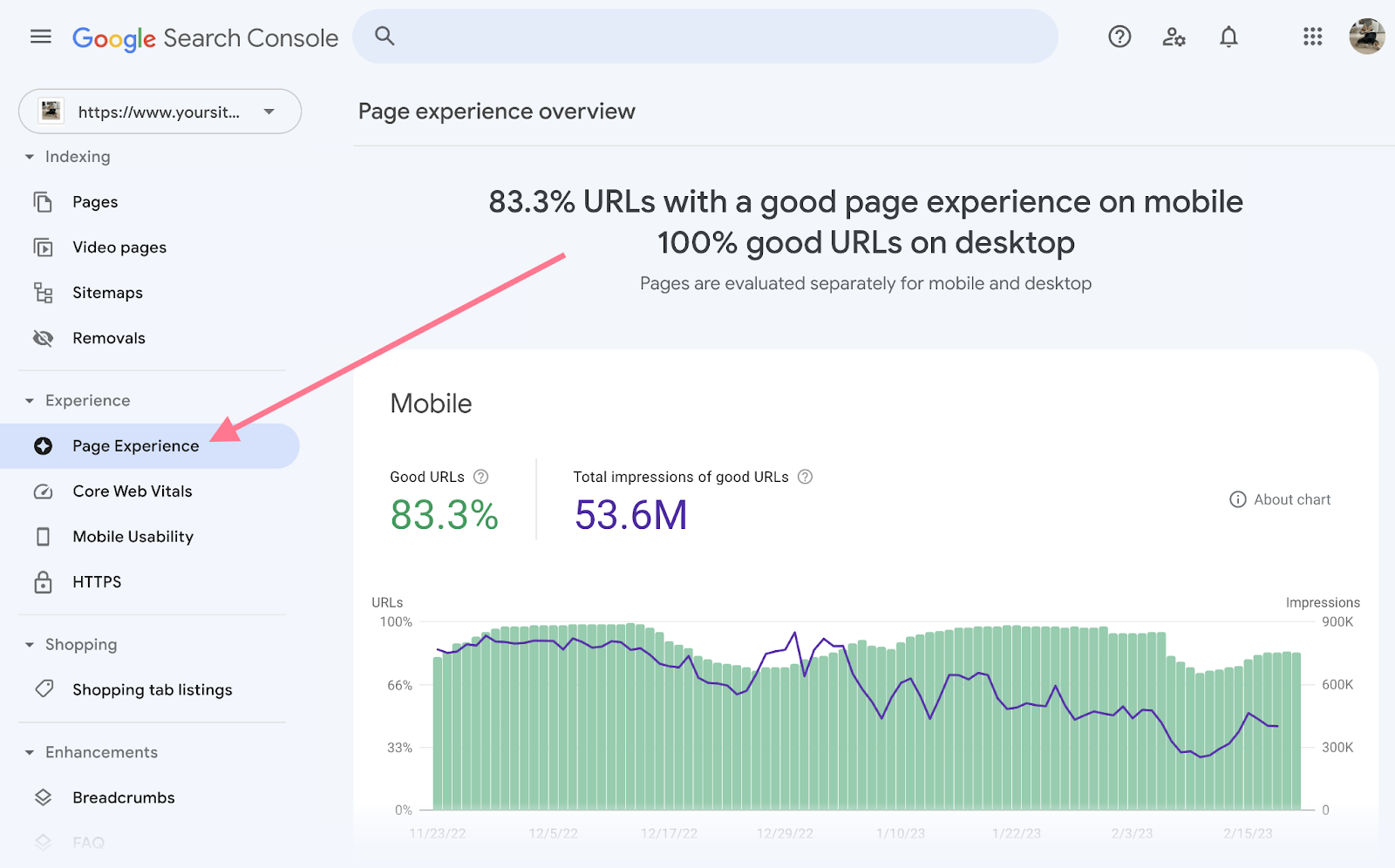
- Enhancements : Information on mobile usability, Core Web Vitals and other technical aspects important for SEO.
Also read: How to optimise your SEO to reach Google’s first page in Morocco
2. Why use Google Search Console?
a. Benefits for organic search
Google Search Console is crucial for optimising your site’s SEO. Key benefits include:
- Performance analysis : Gain valuable insights into keywords that attract traffic and your best-performing pages.
- Detect technical problems : Identify indexing errors and technical problems that could affect visibility.
- Optimise the user experience : Improve mobile usability and Core Web Vitals to give visitors a better experience.
b. Communicate with Google more easily
Google Search Console also lets you communicate directly with Google:
- Submit sitemaps : Help Google index your pages by submitting XML sitemaps.
- Request a review : If security problems or penalties have affected your site, request a review after fixing them.
Also read: The 10 best SEO practices for 2024
3. How to set up Google Search Console
a. Create a Google Search Console account
You need a Google account to use Search Console. If you do not have one, create one:
- Go to Google’s home page.
- Cliquez sur “Se connecter” et choisissez “Créer un compte”.
- Follow the instructions to create a free Google account.
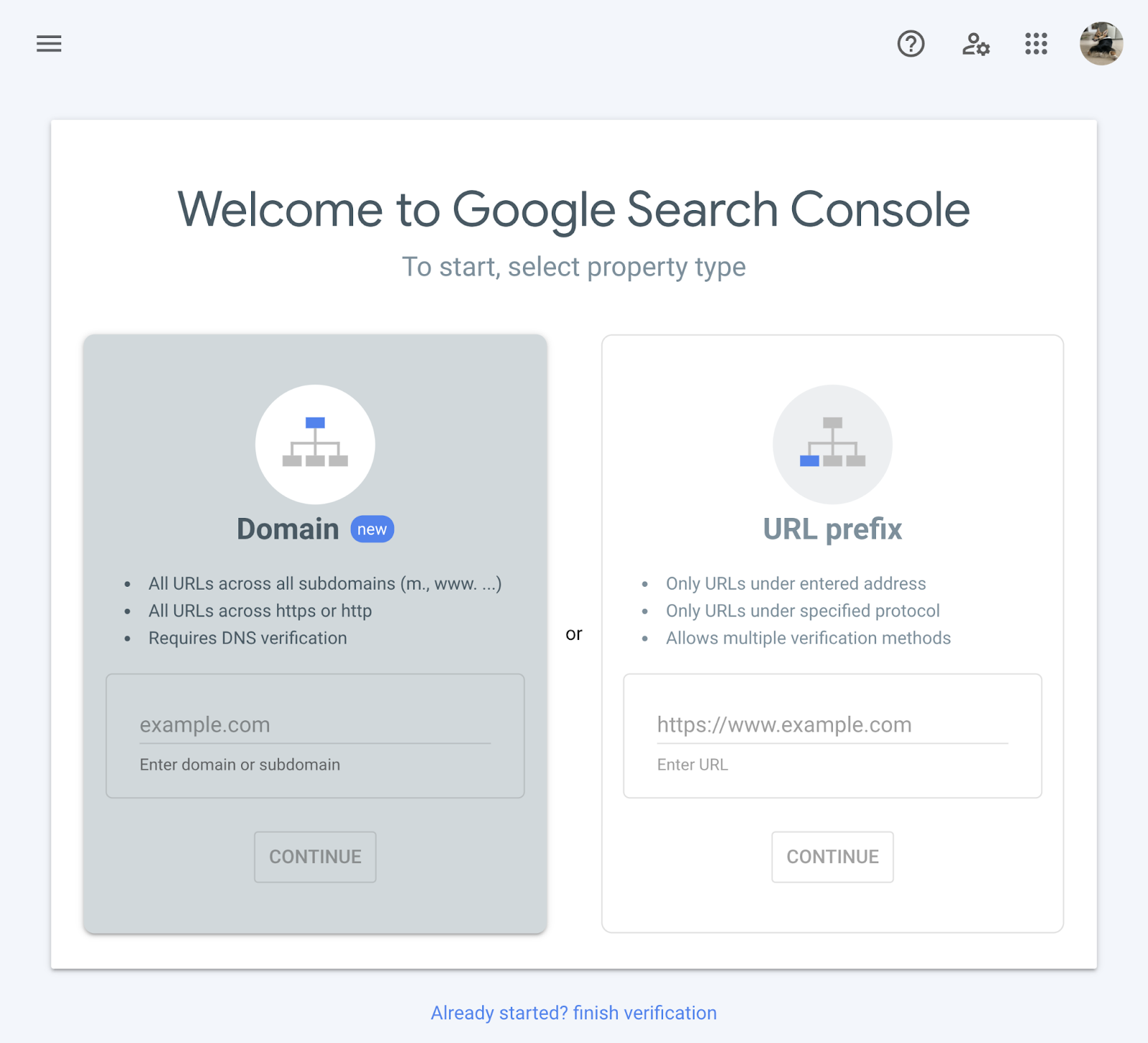
b. Add a property
Once signed in, add your site as a property:
- Open Google Search Console : Sign in with your Google account.
- Add a property : Choisissez entre “Domaine” ou “Préfixe de l’URL”. La méthode “Domaine” couvre l’ensemble du domaine, tandis que “Préfixe de l’URL” cible une version spécifique de l’URL.
c. Verify ownership
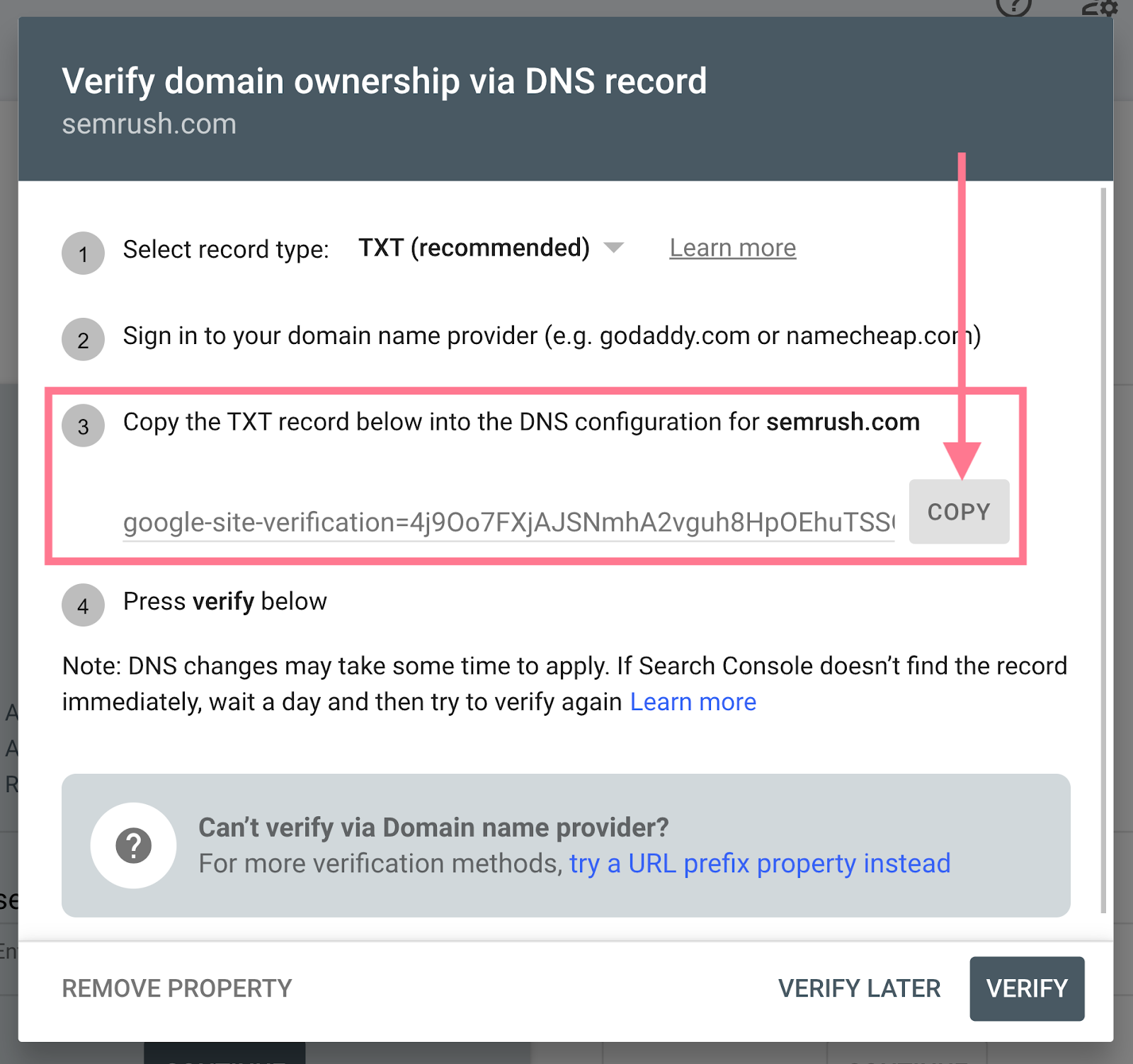
Google must verify that you own the site:
- Upload an HTML file : Download Google’s verification file and upload it to your site’s root directory.
- HTML tag : Add the specified meta tag to the
<head>section of your site. - Google Analytics : Use your Google Analytics account to verify ownership.
- Google Tag Manager : If you use Google Tag Manager, verify ownership through that container.
4. Explore Google Search Console’s essential features
a. Performance report
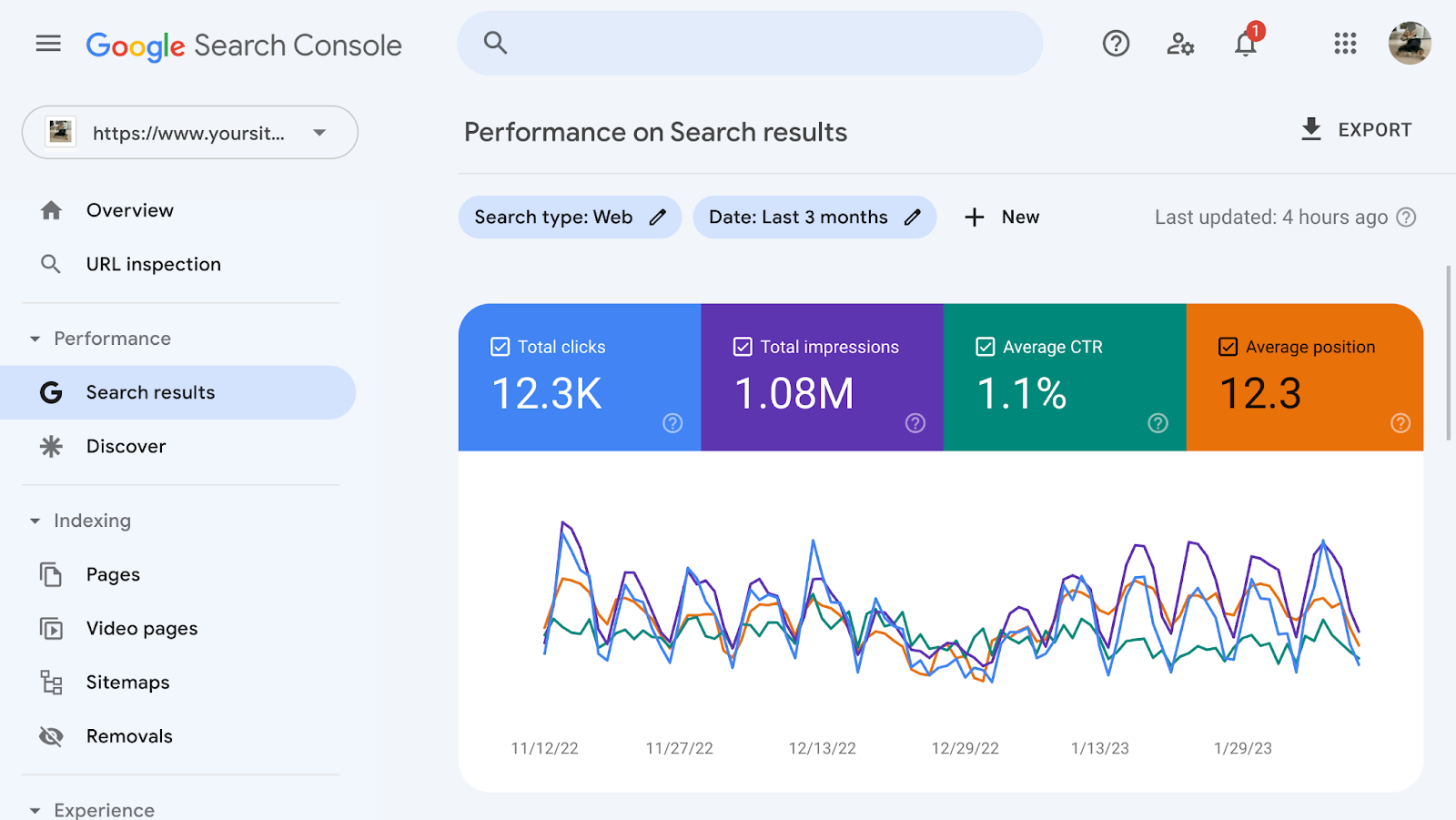
The performance report is fundamental to evaluating your site’s visibility and effectiveness:
- Clicks and impressions : See how often users clicked your site and how often it appeared in search results.
- CTR (click-through rate) : Compare clicks with impressions to assess how appealing your titles and descriptions are.
- Average position : Track your pages’ average position for targeted keywords.
Analyse performance data
Use the data to:
- Identify opportunities : Find keywords and pages with strong traffic potential.
- Improve content : Optimise titles and descriptions to increase CTR.
b. Coverage report
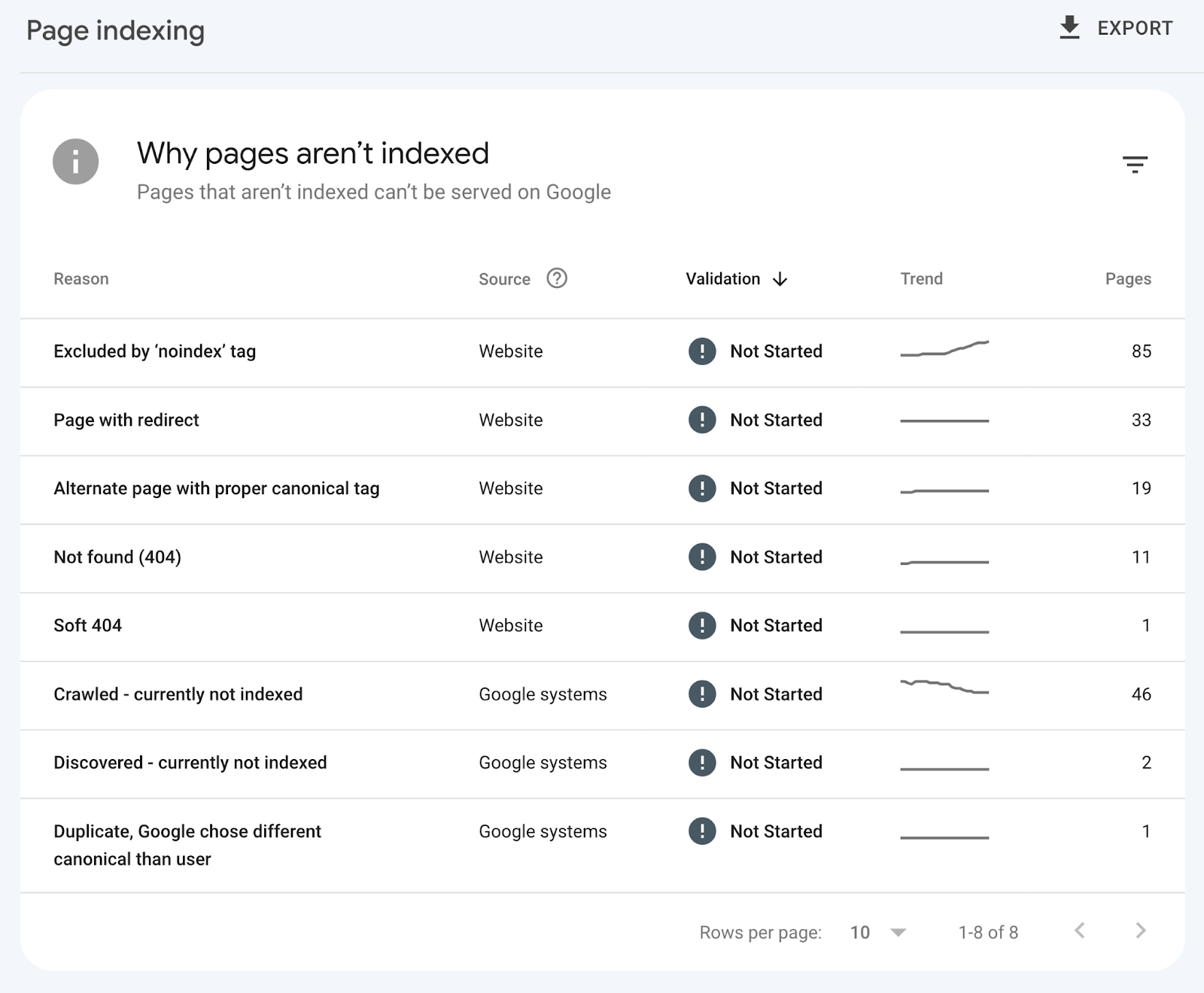
The coverage report helps you monitor your site’s indexing status:
- Valid pages : Pages indexed correctly.
- Excluded pages : Pages not indexed for various reasons, such as robots.txt exclusions or server problems.
- Pages with errors : Pages with technical problems preventing indexing.
Manage indexing errors
To resolve indexing problems:
- Check affected pages : Examine pages reported as having errors.
- Fix 404 errors : Redirect URLs that cannot be found to relevant pages.
- Review your robots.txt file : Make sure you are not accidentally blocking important pages.
c. Enhancements report
L’onglet “Améliorations” fournit des données sur :
- Mobile usability : Check mobile compatibility and fix problems to improve the mobile user experience.
- Core Web Vitals : Track key metrics for loading time, interaction and visual stability.
Optimise mobile usability
To improve mobile usability:
- Test mobile compatibility : Use Google’s tools to check how your site displays on different mobile devices.
- Optimise loading time : Reduce loading times to improve the user experience.
Improve Core Web Vitals
To improve Core Web Vitals:
- Analyse loading times : Use GSC tools to monitor and improve page loading times.
- Visual stability : Make sure page elements load consistently without causing layout shifts.
5. Resolve common problems with Google Search Console
a. Crawl errors
Crawl errors can affect your site’s visibility:
- Check affected URLs : Make sure the reported pages are accessible.
- Fix 404 errors : Set up appropriate redirects for URLs that cannot be found.
- Review robots.txt files : Make sure they do not block access to important pages.
b. Security issues
If Google detects security issues such as hacked content or malware:
- Examine security alerts : Read the alerts carefully to understand the problems.
- Clean up your site : Remove malicious content and secure your site against future attacks.
- Request a review : After fixing the problems, ask Google to review your site to restore its reputation.
6. Use GSC reports for ongoing optimisation
Google Search Console is a powerful tool for continuous optimisation:
- Analyse trends : Track trends in performance data to adjust your SEO strategy.
- Test improvements : Make changes to your site and monitor their effect on performance.
- Develop content strategies : Identify topics and keywords that generate the most traffic to guide content creation.
a. Continuously improve your SEO strategy
To optimise your SEO strategy:
- Reassess regularly : Review site performance periodically and adjust your strategies accordingly.
- Implement recommendations : Apply Google Search Console’s recommendations to keep improving your site.
b. Track performance and make adjustments
For effective tracking:
- Use dashboards : Create custom dashboards to track important metrics.
- Analyse performance reports : Analyse reports in depth to identify improvement opportunities.
Also read: Understanding KPIs: a beginner’s guide
Conclusion
Google Search Console is a valuable tool for any web professional looking to improve site visibility and performance. Its robust features, including performance reports, index coverage management and enhancement analysis, provide essential insights for website optimisation.
By setting up Search Console correctly and using its tools effectively, you can monitor performance, resolve technical problems and make informed decisions to improve your SEO strategy.
Regular use of Google Search Console helps you detect potential problems quickly and continually adjust your SEO strategy to maximise traffic and visibility. Using its data and recommendations prepares you to meet SEO challenges and get the most from your online efforts.
“Unlock your site’s SEO potential by regularly using Google Search Console to track performance, identify problems and optimise visibility in search results.”
GoSocial: your partner of choice
GoSocial is a digital marketing agency in Morocco helping small businesses maximise their online potential. Our services include website creation, SEO, social media management and online advertising. We build measurable strategies tailored to your offer and goals.
Ready to improve your local visibility and attract more customers in your area? Contact GoSocial today for a free audit. Together, let’s make your business the preferred choice of local customers.
Request your quote and start leading local search results with GoSocial.
