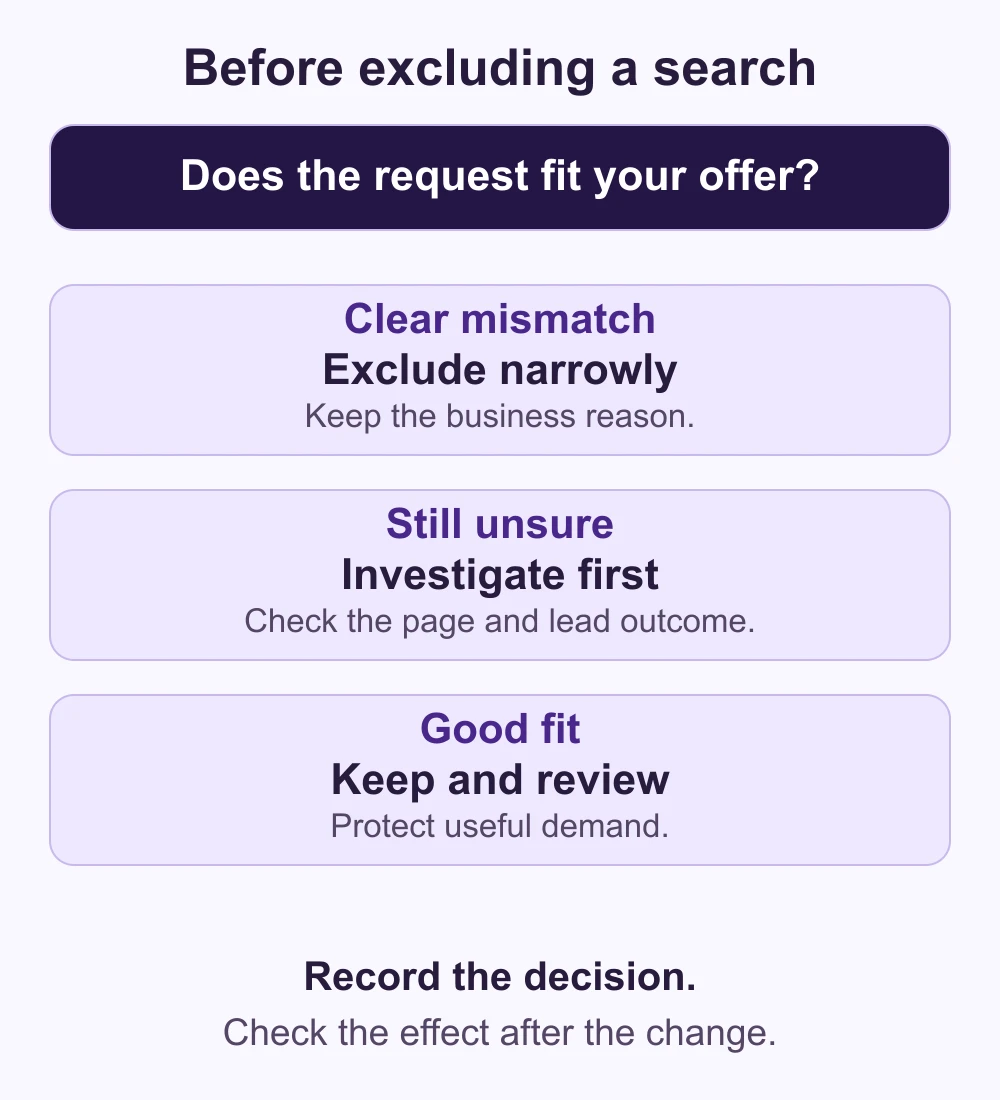
Exclude a Google Ads search term when its intent clearly falls outside the service you sell. Keep a relevant search under review when the evidence is incomplete. A click without an enquiry is a reason to investigate, not automatically a reason to block that customer’s search.
For a service business, the aim is to protect useful demand while reducing obvious mismatches. That requires a clear offer, a working enquiry journey and a record of which leads are suitable. A longer negative keyword list is not, by itself, a sign of better campaign management.
This guide gives business owners a practical way to review exclusions with their agency. It focuses on Google Search campaigns; other campaign types need their own assessment.
Read the search term, not just the keyword
A keyword is your targeting input; a search term is the user’s query. Google’s search terms report helps connect searches with campaign results. Some low-activity queries are omitted for privacy, so the visible rows are not a complete record of every search.
Read the whole query against the advertised offer. “IT support jobs” and “IT support companies” contain similar words but suggest different needs. Before reviewing the report, write down which services, customers, locations and working languages the campaign can actually serve.
A decision table for a service business
The examples below are hypothetical. Assume a company sells business IT support, does not recruit through this campaign and does not sell training. These are decisions to investigate, not a universal list to paste into an account.
| Example query | What to check | Starting decision |
|---|---|---|
| IT support jobs | Is this person looking for employment? | Exclude the confirmed recruitment intent from this service campaign. |
| IT support pricing | Does the page explain the offer and how quotes work? | Keep the commercial enquiry; inspect the page before blaming the query. |
| IT support training | Does the company sell any relevant training? | Exclude only if the requested service is genuinely outside the offer. |
| Remote IT support | Can the team deliver remotely to this customer? | Investigate coverage; “remote” alone is not evidence of poor fit. |
| IT support near me | Can the company serve the location and type of customer? | Keep when suitable; review targeting separately if the location is wrong. |
A business selling both support and training would make different decisions. So would a company actively hiring. Exclusions should follow the campaign’s purpose, not assumptions about whether a word is usually “good” or “bad”.
Separate a wrong intent from an unfinished result
A clearly unrelated service request can justify an exclusion without waiting for a large dataset. A relevant search with no recorded sale is a different problem. Check whether the form works, calls reach the right person and the sales team records what happened.
Look at spend and lead outcomes together. A few clicks may reveal little about a longer buying journey. Someone comparing providers may return later, or the lead may still be awaiting qualification. Mark these cases as unresolved instead of quietly counting them as unsuitable.
If the offer fits but the visitor cannot understand the next step, improve the destination. Our guide to targeted website improvements helps distinguish a specific repair from a wider rebuild.
Choose the exclusion’s wording and reach carefully
For negative keywords in Search, broad requires all listed words, phrase requires their sequence, and exact requires the whole query without extra words. Negatives do not automatically cover close variants. Check the current rules in Google’s negative keyword guidance.
Write down the query you intend to block and useful searches that must remain eligible. For example, blocking a whole service phrase because one recruitment query used it could remove the demand you wanted to reach. Test the wording against both sets before saving.
Choose where the exclusion belongs. A request may be unsuitable for one offer but suitable elsewhere in the account. Do not extend a local decision to every campaign simply because a shared list is convenient. Google explains the available destinations in its instructions for adding exclusions from the report.
Avoid universal lists of “bad” words
“Free”, “cheap”, “reviews” and “training” need context. A business offering a free consultation may want that demand. A customer reading reviews may be choosing a supplier. Training is a buying intent for a training provider. A ready-made list cannot know these distinctions.
Also distinguish a price question from a customer who cannot be served. A search about cost can be commercially relevant even if the buyer is still comparing options. Clarify the offer and qualification process before deciding that every price-conscious enquiry is unwanted.
For international campaigns, consider the language and market of the query. A French term or a US spelling is not automatically irrelevant to a UK-based provider serving those customers. Translate the intent, verify delivery coverage and assess each campaign’s actual remit.
Keep a small, useful change log
For each change, record the observed query, business reason, negative wording, match type, application scope, owner and review date. Add one example of a useful search you checked against it. This makes a later correction much easier than trying to remember why a large list exists.
Review the searches and suitable leads after the change, allowing for the normal enquiry-to-outcome delay. A fall in clicks alone does not prove an improvement. If relevant demand disappears, check the new exclusions alongside other campaign changes before drawing a conclusion.
There is no universal review interval that fits every account. Agree a cadence based on spend, new campaign activity and the team’s capacity to evaluate leads. Keep urgent, obvious mismatches separate from decisions that need more evidence.
What to ask your agency this week
Ask for three things: the clearest mismatches found, the relevant searches still under review, and the changes made with their reasons. Ask how the agency checked that exclusions would preserve useful demand. The number of negatives added is less informative than the decisions behind them.
Before increasing spend, use our Google Ads budget readiness checklist. If the wider channel choice is still uncertain, read our Google Ads versus Meta Ads comparison.
GoSocial can review search intent, the landing page and lead quality together. Explore our Google Ads management, including support for UK businesses and US businesses, or discuss your campaign with us.