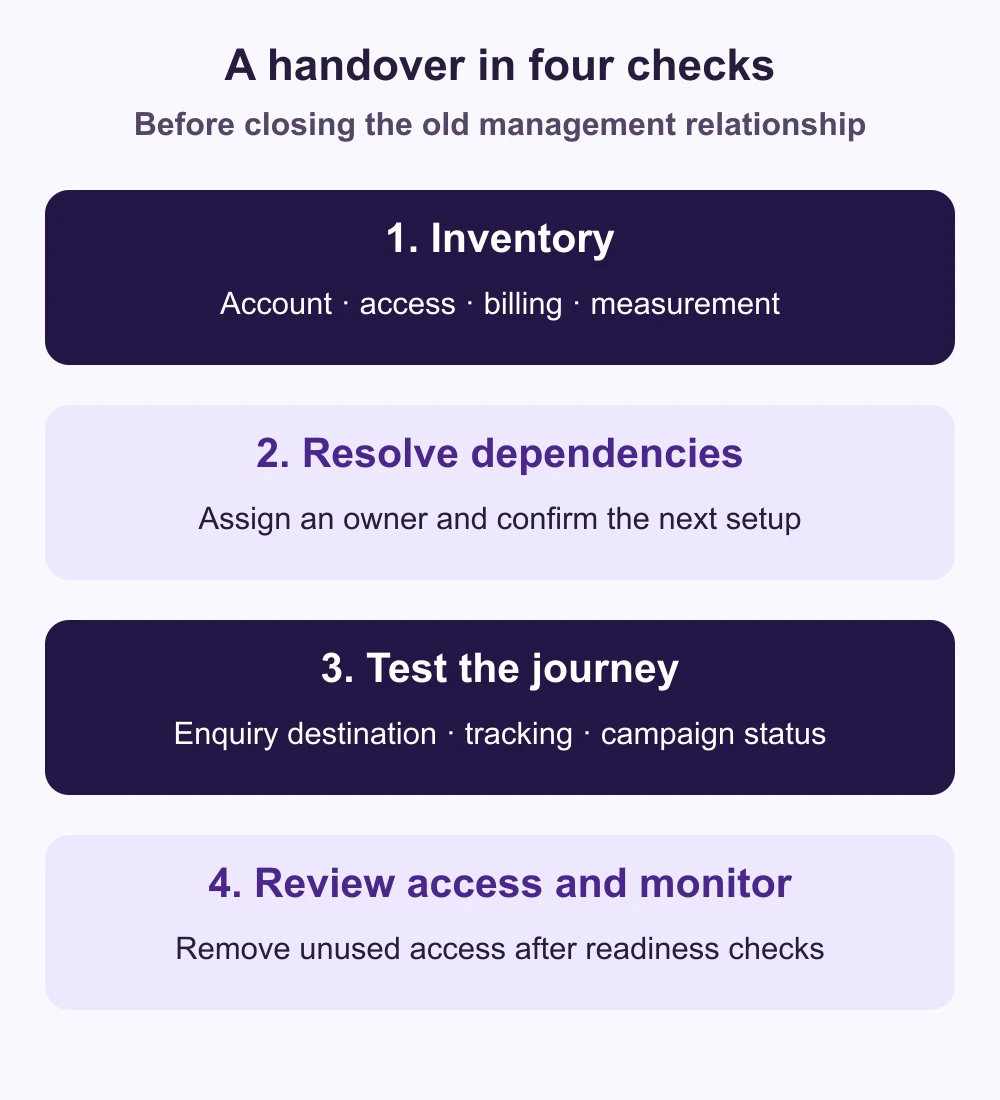
Before switching Google Ads agencies, confirm who can access the account, how advertising is paid for and which systems supply conversions. Then agree a documented handover with a named person responsible for each dependency. Removing the old agency’s access should follow those checks, rather than serve as the first step.
For a service business, the aim is to keep a usable account and a working enquiry journey while responsibilities change. A handover is not automatically a campaign rebuild. This checklist helps an owner or marketing lead ask for evidence, identify unresolved items and define the new agency’s initial scope.
Start with the existing account and a named business contact
Record the Google Ads customer ID, the business contact responsible for the account and the people or manager accounts currently connected. Ask your business contact to demonstrate their own access. A report sent by an agency is useful context, but it is not evidence that your team can sign in and manage the relationship.
Google distinguishes a linked manager from a manager with administrative ownership. Linking an existing account does not automatically give the manager ownership; that role carries additional privileges. Review Google’s ownership explanation before deciding which permissions the incoming agency actually needs.
Use individual access or an appropriate manager-account relationship, rather than sharing a person’s password. For a manager link, Google documents a request-and-accept process using the customer ID. Verify the requesting agency and the intended account before accepting. Document who will approve access and who can resolve an access problem during the change.
Build a handover register with evidence, not just promises
Use the following as a working register. Add a responsible person, due date and evidence link to each row. A screenshot can explain a setting; the incoming team should also be able to inspect the live configuration where its permissions allow.
| Area | Evidence to request | Ready when… |
|---|---|---|
| Access | Customer ID, user roles and linked managers. | The business and incoming team can reach the correct account. |
| Billing | Payment arrangement and responsible billing contact. | The next arrangement is confirmed before removing a dependency. |
| Conversions | Action names, source account, tags or imports, and campaign goals. | A responsible specialist has checked the intended measurement path. |
| Campaigns | Current budgets, locations, schedules, exclusions and bidding dependencies. | The incoming team understands what stays live and why. |
| Enquiries | Landing pages, forms, phone routing and follow-up owner. | A controlled test reaches the intended destination. |
| Decisions | Open tests, recent changes, known issues and pending approvals. | Every unresolved item has an owner and next action. |
Keep the register focused on continuity. An export of campaign data does not explain why a service area was excluded, whether a quote form routes to an abandoned inbox or who can update a call-tracking number. Those are questions to resolve with the outgoing team, not assumptions to fill with a fresh campaign launch.
Resolve manager dependencies before unlinking
Ask where each important conversion action is managed. Google’s unlinking guidance says that unlinking does not remove the individual account’s campaign history. However, manager-provided cross-account tracking stops recording conversions from clicks occurring after unlinking; access to shared audience lists can also be affected.
A tracking specialist should plan any necessary replacement and verify the campaign goals. Google’s cross-account conversion guidance describes tag preparation and transition considerations. Do not treat a change of agency as a reason to delete old conversion actions or remove tracking code without checking those dependencies.
Check the payment setup separately. For monthly invoicing, Google warns that unlinking the paying manager stops ad delivery. Arrange the required billing change before removing that relationship. Confirm the actual payment arrangement rather than assuming every advertiser has this setup.
Also identify shared bidding dependencies. Google’s bidding guidance explains that unlinking from a manager holding a cross-account portfolio strategy can leave campaigns with an invalid strategy and stop their ads until a replacement is selected. Ask the incoming specialist to check this before the access change, alongside any manager-shared audiences.
Preserve context before making performance changes
Ask for an explanation of active campaigns, not just a list of keywords. Record the services promoted, customer locations, lead-quality definition, approved budgets and constraints. Identify tests still in progress and changes awaiting enough data to assess. Save a dated baseline with reporting period, account timezone and conversion definitions.
For example, imagine a hypothetical consultancy whose outgoing agency manages call routing while the business handles website forms. A clean-looking campaign export would miss the phone dependency. The handover needs a named person to verify where calls arrive and how they are recorded before the old service is removed. This is a planning example, not a client result.
Separate continuity work from optional optimisation. Correct a broken enquiry route promptly, but record the reason for broader changes to targeting, bids or landing pages. Changing everything during the handover makes later comparisons harder to interpret. Our lead-tracking guide helps define suitable enquiries, while the budget checklist helps frame a separate spending decision.
Close the handover with a practical acceptance check
Before ending the old arrangement, confirm the new team’s access, required billing and measurement setup, campaign status and enquiry destinations. Run an agreed test submission or call without creating a fake customer record that could be mistaken for a real lead. Label test records clearly, and have the responsible specialist check the expected tracking path and any relevant reporting delay.
Agree who monitors delivery and incoming enquiries after the transition, how an issue is escalated and when the first review happens. Remove access that is no longer required once the dependencies are resolved and the change is authorised. A completed register reduces uncertainty; it cannot guarantee uninterrupted delivery or better campaign performance.
Considering a new agency? Ask GoSocial to scope your Google Ads handover. Share the services and markets you target, the account’s current management arrangement and known gaps—not passwords. Start with our Google Ads management service to discuss responsibilities before agreeing campaign changes.